
Cab reservation
The "Cab Reservations" screen presents customers with their scheduled cab trips. Each entry in the list corresponds to an individual cab reservation, providing essential details of the journey at a glance.
Functionality for Customers
- Customers can review all their upcoming and past cab bookings on this screen.
- Reservations show who made the booking, where the cab will pick up and drop off, the departure time, and the status of the trip.
- The status informs customers whether a trip is still planned (Scheduled) or has been called off (Cancelled).
- Customers can interact with this screen to get more information about each trip by selecting a specific booking, which could reveal further details such as the cab number, the driver's name, or the fare estimate.
- A feature is available to add new reservations, allowing customers to schedule new trips when needed.
- For convenience, a pagination feature is in place to navigate through multiple bookings.
Customer Experience
- The design is intuitive, enabling customers to quickly identify the information they need regarding their cab reservations.
- The information provided helps customers plan their time accordingly and manage their travel arrangements with ease. A simple, straightforward interface ensures that customers can effortlessly understand their travel schedule, upcoming trips, and any changes to their bookings.

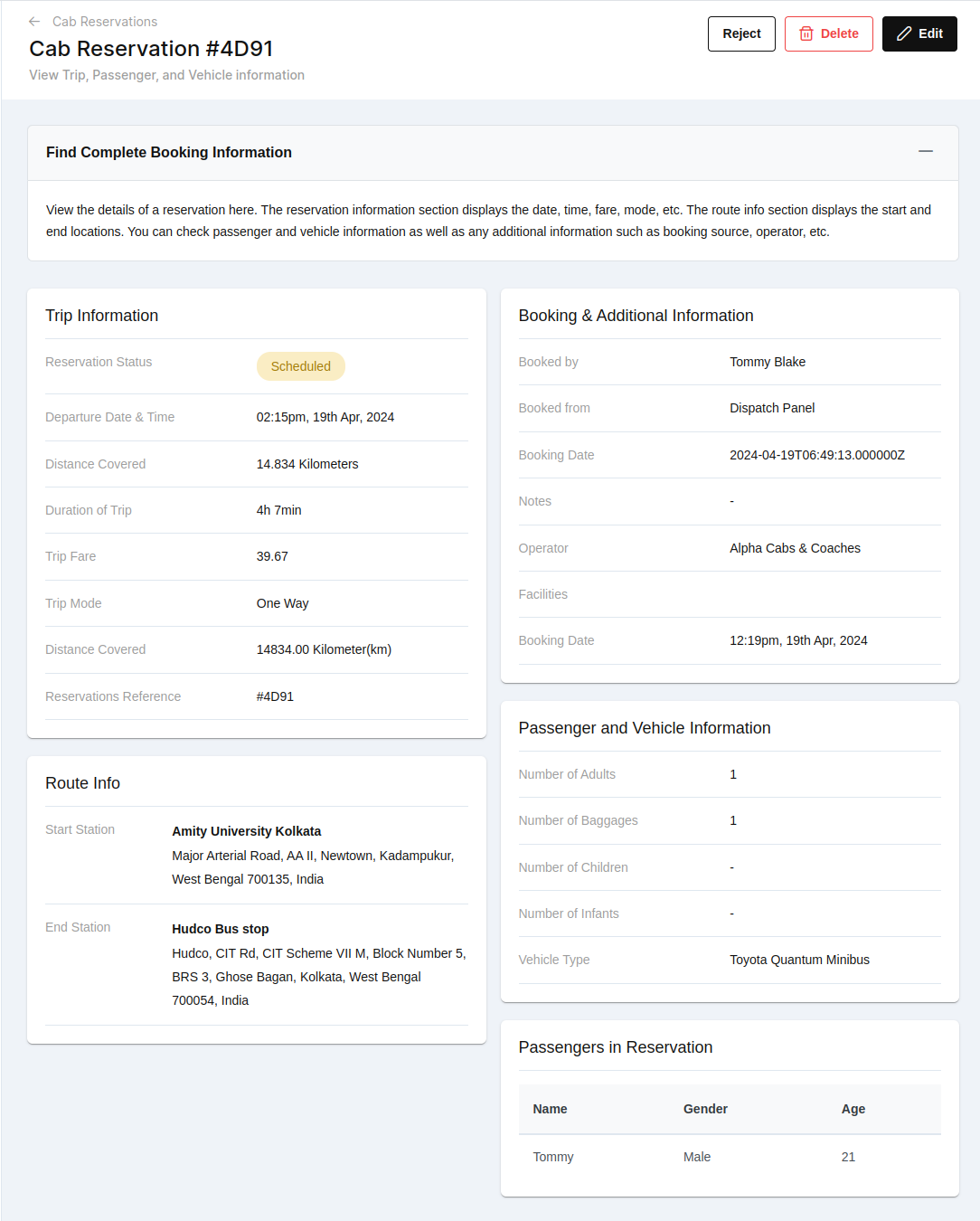
- When a customer selects a specific cab reservation, they are presented with a detailed overview of the booking. For the reservation with the reference number 4D91, the following details are provided:
Header Functions:
- Reject: This option cancels the reservation.
- Delete: This action completely removes the reservation from the system.
- Edit: This allows for modifications to the reservation details.

-
Trip Information:
- Reservation Status: Currently 'Scheduled', indicating that the trip is planned to proceed.
- Departure Date & Time: The trip is set to begin at 02:15 pm on April 19th, 2024.
- Distance Covered: The trip will span 14.834 kilometers.
- Duration of Trip: Expected to last 4 hours and 7 minutes.
- Trip Fare: The cost of the trip is noted as 39.67.
- Trip Mode: Listed as 'One Way'.
- Reservations Reference: Unique identifier #4D91.
-
Route Information:
- Start Station: Departure from Amity University Kolkata.
- End Station: Arrival at the Hudco Bus stop in Kolkata.
-
Booking & Additional Information:
- Booked by: The reservation was made by Tommy Blake.
- Booked from: The booking originated from the 'Dispatch Panel'.
- Booking Date: The reservation was logged at 10:06 am on April 19th, 2024.
- Notes: A space for additional booking-related notes (not utilized in this instance).
- Operator: Managed by 'Alpha Cabs & Coaches'.
- Facilities: Specific services or amenities included (if any).
-
Passenger and Vehicle Information:
- Number of Adults: Reflects the count of adult passengers.
- Number of Baggage: Indicates how many pieces of baggage are accounted for.
- Number of Children: If applicable, the count of children traveling.
- Number of Infants: If applicable, the count of infants traveling.
- Vehicle Type: Specifies the vehicle booked for the trip, a 'Toyota Quantum Minibus'.
-
Passengers in Reservation:
- Name: Lists the name(s) of the passenger(s).
- Gender: Indicates the gender of each passenger.
- Age: Displays the age(s) of the passenger(s), which in this reservation is noted for reference.
Add reservation
When a customer clicks the "Add Reservation" button for a cab, they are taken to a form where they can input all the necessary details for their new cab reservation. Here’s a detailed walkthrough of the process:
Learn About Adding a New Cab Transfer Booking: This introductory section provides customers with a brief explanation of the booking process and what information is required. It outlines that the form will capture details such as journey date, trip mode, vehicle type, and stations. It also mentions that additional passenger and luggage details, any extra paid services, and the booking source need to be filled in.
Form Sections and Fields:
1. Routes and Trips Tab:
- Journey Date: Customers will choose the date for their cab reservation. This is usually done via a calendar picker for convenience.
- Journey Time: Here, users specify what time they need to be picked up, using a time selection tool.
- Trip Mode: A dropdown menu allows customers to select the type of trip they are booking, such as one-way, round trip, or hourly hire.
- Stations: This is where the start and end points of the journey are entered. If there are multiple stops along the route, users can add them by clicking a '+' button beside the station field.

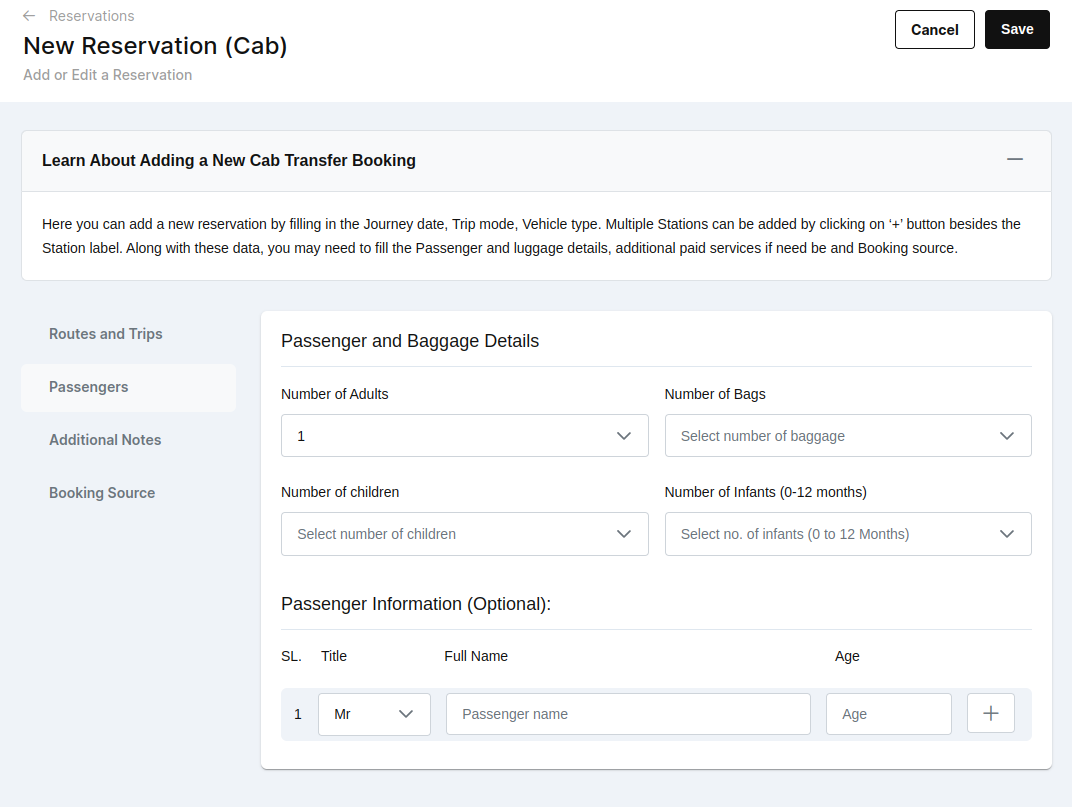
2. Passengers Tab:
- Number of Adults/Children/Infants: Dropdown menus allow the customer to indicate how many people are traveling and their age categories, which could affect the type of vehicle needed.
- Number of Bags: Users can state how much luggage they will carry, helping to ensure that the vehicle can accommodate all passengers and their belongings comfortably.
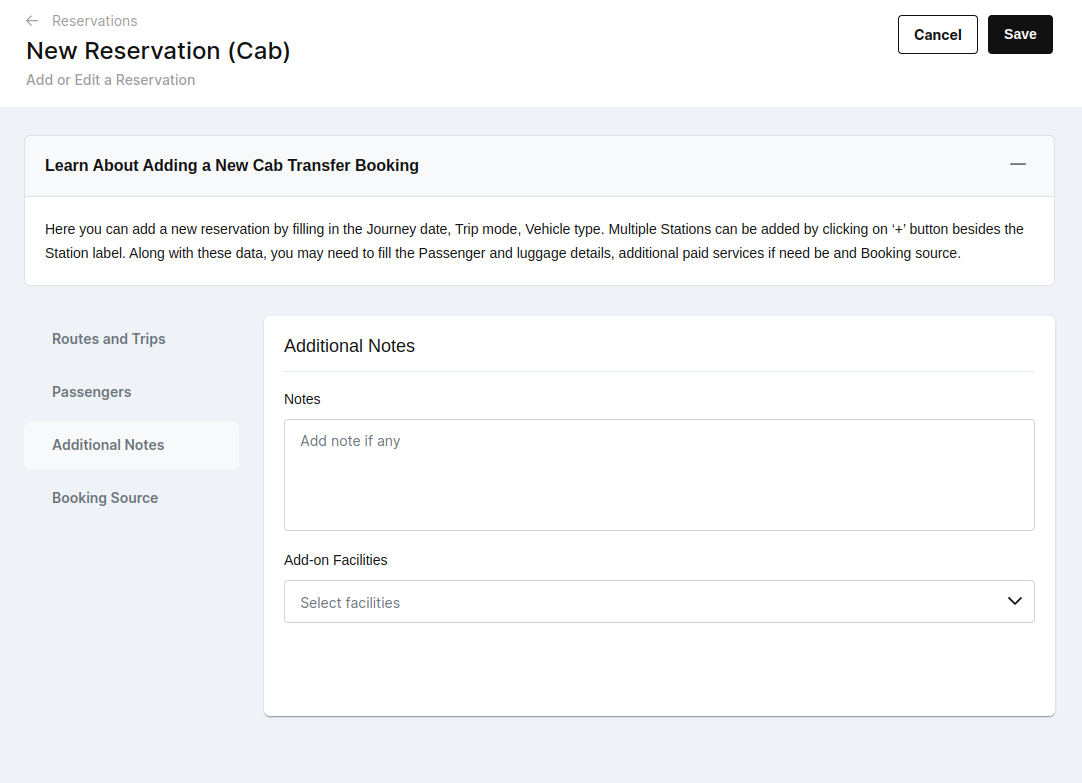
3. Additional Notes Tab:
- This free-form text field is for any extra details the customer feels are important to note. These could be preferences like a desire for a quiet ride, requests for specific amenities like a car seat, or alerts about potential delays at the pickup point.
4. Booking Source Tab:
- Booked From: A dropdown where the customer selects the platform or method they used to make the reservation (e.g., mobile app, online booking system, telephone).
- Booked By: If the reservation is being made by someone other than the passenger, such as a personal assistant or family member, their name would be entered here.

These tabs help organize the booking process into manageable sections, ensuring that all necessary details for the cab reservation are collected accurately and efficiently. The customer navigates through each tab, filling in information, which then forms the complete details of their upcoming cab journey.